Introduction
What IntegraCI is, and the ideas the rest of these docs build on.
IntegraCI is an AI-native internal developer platform. It gives your teams one place to build, ship, secure, and operate software, and it does that by governing the tools you already run rather than replacing them. You keep your source control, your CI engine, your scanners, and your clouds. IntegraCI connects to them, puts golden paths and policy on top, and records what happened.
The platform is organized around six pillars that cover the software lifecycle end to end:
- Deliver: golden paths, pipelines, and deploys that work the same way across targets.
- Quality: scorecards, tests, and quality gates.
- Secure: scanning, supply chain, database-enforced tenant isolation, and policy checks before risky actions.
- Operate: reliability, observability, and cost signals, sitting next to the controls to act on them.
- Govern: policy as code, evidence collection, and a tamper-evident audit trail.
- AI: a governed gateway, copilot, and agents, used with your own model provider.
The through-line is governance
Most platforms help you move faster. IntegraCI helps you move faster and stay inside the lines, because the guardrails are built in rather than bolted on. A connector’s credentials go into a dedicated secrets store, every AI action that changes something pauses for a human to approve, and one tenant can never read another’s data because the database itself enforces the boundary.
That means the same work that ships your software also produces the evidence an auditor asks for. You do not assemble it after the fact.
What you connect, and what stays yours
IntegraCI orchestrates and gates the tools in your stack. It does not run your scanners for you or become your CI engine. When a pipeline runs, your build runners do the building and your scanners do the scanning; IntegraCI sequences the steps, enforces the policy gates, and rolls the results into one view.
Your credentials, your code, and your data stay yours. On a self-hosted install, all of it runs in your own infrastructure, up to a fully air-gapped deployment.
How the pieces fit together
People work in the IntegraCI portal, the CLI, or the AI assistant. IntegraCI drives the delivery toolchain, and the toolchain builds your code and deploys your apps to where they run. Day to day you do not need to log in to each tool: the portal is the front door for onboarding, deploying, approving, and monitoring.
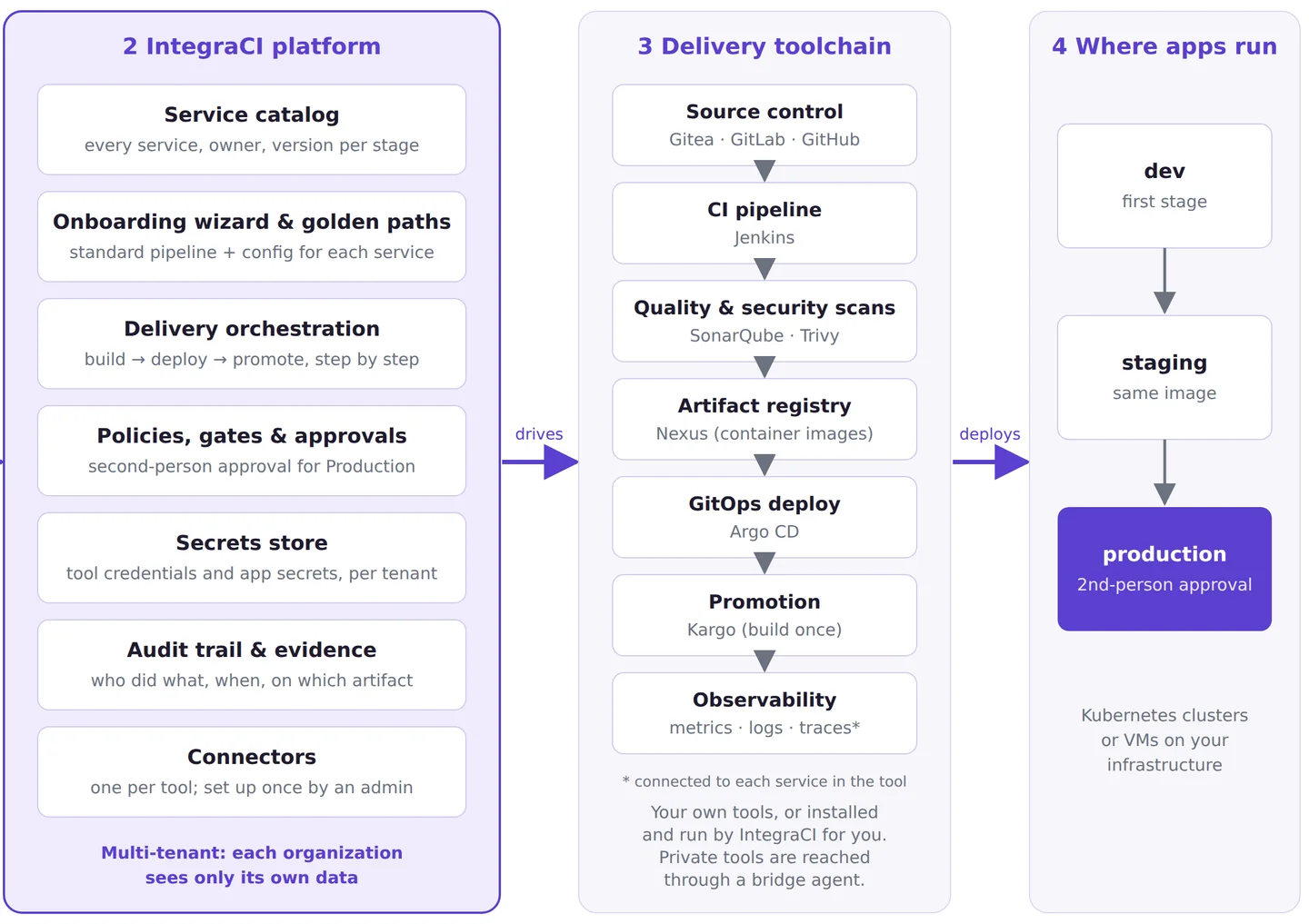
An example toolchain. The tools are your own, or installed and run by IntegraCI for you; private tools are reached through a bridge agent. Production normally needs a second person’s approval; see Roles and approvals for the exceptions.
Who does what
Admins set the platform up once. After that, every service follows the same path from code to Production.
| When | Who | What happens |
|---|---|---|
| Once | Owner or Admin | Sets the platform up: connects the toolchain, registers where apps run, sets policies, invites the team. See Administer your organization. |
| Per service | Developer, Partner, or Admin | Adds the service with the Add service wizard. See Add your first service. |
| Per service | IntegraCI | Wires the service in: registers it in the catalog, creates its secret paths, sets up repository webhooks, branch protection, the CI pipeline, dashboards, and SLOs. |
| Every change | Developer | Pushes code to the service’s repository. |
| Every change | Your CI | Builds, tests, and scans the change, and stores the image once. IntegraCI starts the run, gates the result, and records the image. |
| Every change | Anyone allowed to deploy to the stage | Deploys and promotes the same image from stage to stage. The first stage can deploy automatically, depending on the delivery option chosen for the service. |
| Production | Owner, Admin, or Release manager | Approves the Production change, normally someone other than the person who asked. |
Every step is recorded in the audit log. See Build, deploy, promote and Roles and approvals for the detail.
How these docs are organized
- Get started takes you from your account to your first service, explains roles and approvals, and covers your account’s security.
- The sections that follow (Build & connect, Deliver, Secure, Operate, Govern, AI) cover each area in depth.
- Administer is for the people who set the platform up for everyone else.
If you are new, start with the Quickstart. If you want the vocabulary first, read Core concepts. If something is not working, see Getting help.